Wrox Press Java Programming 24-Hour Trainer 2nd (2015)
Lesson 16. Network Programming Basics
Computers connected to a network can communicate with each other only if they agree on the rules of communication, called protocols, that define how to request the data, if the data should be sent in pieces, how to acknowledge received data, if the connection between two computers should remain open, and so on. TCP/IP, UDP/IP, FTP, HTTP, and WebSocket are some examples of network protocols.
Local area network (LAN) refers to a computer network connecting devices in a small area—for example, the same office or house, or a rack. Interconnected computers located farther apart or that belong to different companies are part of a wide area network (WAN). The Internet consists of millions of networks and individual devices. Connected networks that belong to the same organization are referred to as an intranet. For security reasons intranets are shielded from the rest of the world by special software called firewalls. This lesson introduces networking using HTTP protocol and sockets.
The World Wide Web (WWW) uses uniform resource locators (URLs) to identify online resources. For example, the following URL says that there is (or will be generated on the fly) a document called training.html located at the remote host known as mycompany.com, and that the program should use the HTTP protocol to request this document. It also states that this request has to be sent via port 80.
http://www.mycompany.com:80/training.html
The hostname must be unique, and it is automatically converted to the Internet Protocol (IP) address of the physical server by your Internet service provider (ISP), which is also known as your hosting company. The IP address is a group of four numbers (IPv4)—for example 122.65.98.11—or up to eight hexadecimal numbers (IPv6)—such as 2001:cdba:0000:0000:0000:0000:3257:9652 . Most of the individuals connected to the Internet are getting dynamic (not permanent) IP addresses assigned to their computers, but for an extra fee you can request a static IP address that can be assigned to any server located in your basement, office, or garage. In enterprises, network computers usually get static (permanent) IP addresses. For individual use, it’s sufficient to have a dynamically assigned IP address as long as your ISP can find your server by resolving a domain name to the current IP address.
Finding a resource online is somewhat similar to finding a person by his or her address. The role of an IP address is similar to the role of a street number of a building, and a port plays the role of an apartment number in that building. Many people can live in the same building, just as many programs can run on the same server. A port is simply a unique number assigned to a server program running on the computer.
Multiple Java technologies exist for providing data exchange among computers in a network. Java provides classes for network programming in the package java.net. This lesson shows you how to read data from the Internet using the class URL as well as direct socket-to-socket programming. Starting with Lesson 25 you become familiar with other technologies that you can use over the network: Java Servlets, RMI, EJB, Web Services, and JMS.
Reading Data from the Internet
You learned in Chapter 14 that to read local file streams, a program has to know the file’s location—for example, c:\practice\training.html. The same holds true for reading remote files—the only difference is that you open the stream over the network. Consider reading remote data using HTTP protocol. Java has a class, java.net.URL, that helps you connect to a remote computer on the Internet and get access to a resource there, provided that it’s not protected from the public. First, create an instance of the URL of your resource:
try{
URL xyz = new URL("http://www.xyz.com:80/training.html");
...
}
catch(MalformedURLException murle){
murle.printStackTrace();
}
The MalformedURLException is thrown if an invalid URL has been specified—for example, if you typed htp instead of http or included extra spaces. If the MalformedURLException is thrown, it does not indicate that the remote machine has problems; just check “the spelling” of your URL.
Creation of the URL object does not establish a connection with the remote computer; you still need to open a stream and read it. Perform the following steps to read a file from the Internet via HTTP connection:
1. Create an instance of the class URL.
2. Create an instance of the URLConnection class and open a connection using the URL from Step 1.
3. Get a reference to the input stream of this object by calling the method URLConnection.getInputStream().
4. Read the data from the stream. Use a buffered reader to speed up the reading process.
While using streams over the networks you’ll have to handle possible I/O exceptions the way you did while reading the local files. The server you are trying to connect to has to be up and running, and, if you’re using HTTP-based protocols, a special software—a web server—has to be “listening to” the specified port on the server. By default, web servers are listening to all HTTP requests on port 80 and to secure HTTPS requests directed to port 443.
The program in Listing 16-1 reads the content of the existing or generated file index.html from google.com and prints its content on the system console. To test this program your computer has to be connected to the Internet.
Listing 16-1: Reading the content of the home page at google.com
public class WebSiteReader {
public static void main(String args[]){
String nextLine;
URL url = null;
URLConnection urlConn = null;
try
{
// Assume index.html is a default home page name
url = new URL("http://www.google.com" );
urlConn = url.openConnection();
} catch( IOException e){
System.out.println("Can't connect to the provided URL:" +
e.toString() );
}
try( InputStreamReader inStream = new InputStreamReader(
urlConn.getInputStream(), "UTF8");
BufferedReader buff = new BufferedReader(inStream);){
// Read and print the content of the Google's home page
while (true){
nextLine =buff.readLine();
if (nextLine !=null){
System.out.println(nextLine);
}
else{
break;
}
}
} catch(IOException ioe){
System.out.println("Can't read from the Internet: "+
ioe.toString());
}
}
}
The code in Listing 16-1 creates an instance of the class URL, then gets a reference to an instance of URLConnection to open a connection with the stream, and, finally, opens InputStreamReader, which is chained with BufferedReader. Run this program and you see the output shown inListing 16-2.
Listing 16-2: The fragment of console output shown after google.com is read
<!doctype html><html itemscope="" itemtype="http://schema.org/WebPage"
lang="en">
<head><meta content="Search the world's information,
including webpages, images, videos and more. Google has many special
features to help you find exactly what you're looking for."
name="description"><meta content="noodp" name="robots">
<meta content="/images/google_favicon_128.png" itemprop="image">
<title>Google</title><script>(function(){
window.google={kEI:"kJLGU6f4DJSqyAT6l4K4DA",getEI:function(a){
for(var c;a&&(!a.getAttribute||!(c=a.getAttribute("eid")));)
a=a.parentNode;return c||google.kEI},https:function()
{return"https:"==window.location.protocol},
kEXPI:"4791,25657,4000116,4007661,4008142,4009033,4009641,
...
</script></div></body></html>
The class WebSiteReader explicitly creates the object URLConnection. Strictly speaking, you could achieve the same result by using only the class URL:
URL url = new URL("http://www.google.com");
InputStream in = url.openStream();
BufferedReader buff= new BufferedReader(new InputStreamReader(in));
The reason you may consider using the URLConnection class is that it could give you some additional control over the I/O process. For example, by calling its method setDoOutput(true) you specify that this Java program is intended to write to the remote URL, too. In the case of HTTP connections, this will also implicitly set the type of request to POST (see Chapter 26). The method useCaches() of URLConnection also allows you to specify whether the protocol can use a cached object or should always request a fresh copy of the document at a specified URL. In general, if you are planning to write Java programs that will only use the HTTP protocol, use the class HttpURLConnection, which supports HTTP-specific features, such as processing header fields, getting HTTP response codes, setting request properties, and so on.
Connecting Through HTTP Proxy Servers
For security reasons, most enterprises use firewalls (see http://en.wikipedia.org/wiki/Firewall_%28computing%29) to block unauthorized access to their internal networks. As a result their employees can’t directly reach the outside Internet world (or even some internal servers), but go throughHTTP proxy servers. Check the settings of your Internet browser to see if you are also sitting behind a firewall, and find out the hostname and port number of the proxy server if you are. Usually, web browsers store proxy parameters under the Advanced tabs of their Settings or Preferences menus.
If your browser has downloaded a page containing a Java applet, the latter knows the parameters of the proxy servers and can make requests to the remote servers through the firewall. But a regular Java application should specify networking properties http.proxyHost and http.proxyPort to “drill a hole” in the firewall. For example, if the name of your proxy server is proxy.mycompany.com and it runs on port 8080, the following two lines should be added to the Java application that needs to connect to the Internet:
System.setProperty("http.proxyHost","http://proxy.mycompany.com");
System.setProperty("http.proxyPort", 8080);
If you do not want to hardcode these values, pass them to your program from the command line:
java -Dhttp.proxyHost=http://proxy.mycompany.com
Dhttp.proxyPort=8080 WebSiteReader
The other option for programmatically specifying proxy parameters is to do it via the class java.net.Proxy. The code for the same proxy server parameter would look like this (you can replace the name of the server with an IP address):
Proxy myProxy = new Proxy(Proxy.Type.HTTP,
new InetSocketAddress ("http://proxy.mycompany.com", 8080));
url = new URL("http://www.google.com/index.html");
urlConn = url.openConnection(myProxy);
How to Download Files from the Internet
Combine the class URL with the writing files techniques and you should be able to download practically any unprotected file (such as images, music, and binary files) from the Internet. The trick is in opening the file stream properly. Listing 16-3 shows the code of a Java class, FileDownload,which gets the URL and the destination (local) filename as command-line arguments, connects to this resource, and downloads it into a local file.
Listing 16-3: Downloading an arbitrary file from the Internet
class FileDownload{
public static void main(String args[]){
if (args.length!=2){
System.out.println(
"Proper Usage:java FileDownload SourceFileURL OutputFileName");
System.out.println(
"For example: " +
"java FileDownload http://myflex.org/yf/nyc.jpg nyc.jpg");
System.exit(-1);
}
URLConnection fileStream=null;
try{
URL remoteFile=new URL(args[0]);
fileStream=remoteFile.openConnection();
} catch (IOException ioe){
ioe.printStackTrace();
}
try( FileOutputStream fOut=new FileOutputStream(args[1]);
InputStream in = fileStream.getInputStream();){
// Read a remote file and save it in the local one
int data;
System.out.println("Starting the download from " + args[0]);
while((data=in.read())!=-1){
fOut.write(data);
}
System.out.println("Finished downloading the file "+args[1]);
} catch (Exception e){
e.printStackTrace();
}
}
}
Specifying Command-Line Parameters for FileDownload
Note how this FileDownload program starts by checking the number of provided command parameters: If the number is anything but two, the program prints an error message and quits. Here’s an example of how you can run this program from the command line to download a photo of New York City that I made in July of 2014.
java FileDownload http://myflex.org/yf/nyc.jpg nyc.jpg
If you prefer to run this program from Eclipse, select the Run Configurations menu (use the drop-down menu with the green button on the toolbar), select FileDownload as the main class, and enter http://myflex.org/yf/nyc.jpg nyc.jpg in the Program Arguments box (it’s under the Arguments tab). The file will be downloaded in your project directory, and you can see it in Eclipse by selecting Refresh on the project.
The Stock Quote Program
This section shows you how to write a program that can read stock market price quotes from the Internet. There are many Internet sites providing such quotes; the Internet portal Yahoo! is one of them.
Visit http://finance.yahoo.com, enter the symbol of any stock (AAPL for example), and press the Search Finance button. You see the pricing information about Apple, Inc.—a fragment of this web page is shown in Figure 16-1.
The URL that can be used to get to this page directly is http://finance.yahoo.com/q?s=AAPL .
Right-click this web page and select View Page Source (or similar) from the pop-up menu to see the HTML contents of this page; you see lots of HTML tags, and the information about AAPL is buried somewhere deep inside. The class WebSiteReader that you used earlier in this lesson reads the content of the Google home page. Modify the line in the class WebSiteReader from Listing 16-1 to have it print the content of the Apple’s price quote page on the system console:
url = new URL("http://finance.yahoo.com/q?s=AAPL");
You can also store the whole page in a Java String variable instead of printing the lines on the console. In the following code snippet I use the class StringBuilder that’s a more efficient way of concatenating strings than the immutable class String itself. Just modify the while loop in Listing 16-1:
// Create an instance of StringBuilder with initial capacity ~10Kb
StringBuilder sb = new StringBuilder(10000);
String theWholePage;
String txt;
while (txt =buff.readLine() != null ){
sb.add(txt);
}
theWholePage=sb.toString()
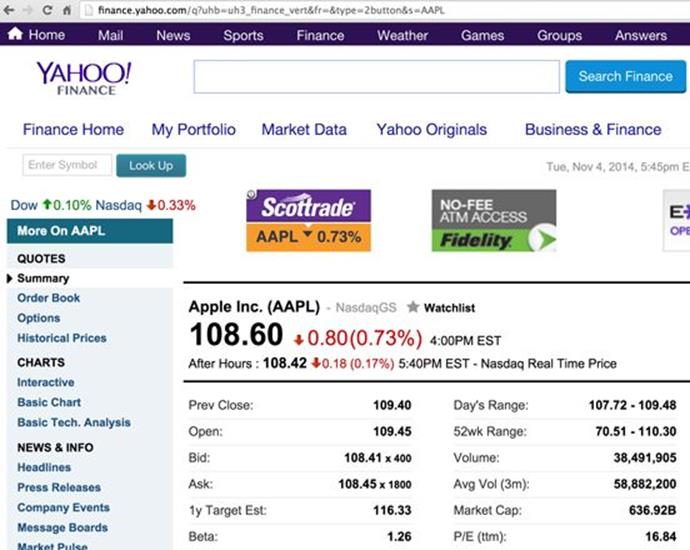
Figure 16-1: Figure 16-1. The Apple’s stock in November of 2014
If you add some smart tokenizing (splitting into parts based on the specified tokens as in Listing 16-4) of theWholePage to get rid of all HTML tags and everything but a fragment around (AAPL), you can create your own little Stock Quote program. Although this approach is useful to sharpen your parsing skills, it may not be the best solution, especially if Yahoo! changes the presentation of the stock symbol on this page (e.g., removes parentheses). That’s why the example uses another URL that provides stock quotes in a cleaner comma-separated values (CSV) format. Here’s the URL that should be used for the symbol AAPL:
http://quote.yahoo.com/d/quotes.csv?s=AAPL&f=sl1d1t1c1ohgv&e=.csv
This URL produces a string that includes the stock symbol, last trade, date and time of the price quote, earning per share (EPS), opening price, day’s range, and volume.
"AAPL",108.60,"11/4/2014","4:00pm",-0.80,109.45,109.49,107.72,414989
Now the task of tokenizing the entire web page comes down to parsing this short CSV line. The StockQuote class from Listing 16-4 does exactly this: It accepts the stock symbol from the command line, gets the data from Yahoo!, tokenizes the received CSV line, and prints the price quote on the console.
Listing 16-4: Retrieving and printing stock quotes
public class StockQuote {
static void printStockQuote(String symbol){
String csvString;
URL url = null;
URLConnection urlConn = null;
try{
url = new
URL("http://quote.yahoo.com/d/quotes.csv?s="
+ symbol + "&f=sl1d1t1c1ohgv&e=.csv" );
urlConn = url.openConnection();
} catch(IOException ioe){
ioe.printStackTrace();
}
try(InputStreamReader inStream =
new InputStreamReader(urlConn.getInputStream());
BufferedReader buff = new BufferedReader(inStream);){
// get the quote as a csv string
csvString =buff.readLine();
// parse the csv string
StringTokenizer tokenizer=new StringTokenizer(csvString, ",");
String ticker = tokenizer.nextToken();
String price = tokenizer.nextToken();
String tradeDate = tokenizer.nextToken();
String tradeTime = tokenizer.nextToken();
System.out.println("Symbol: " + ticker +
" Price: " + price + " Date: " + tradeDate
+ " Time: " + tradeTime);
} catch(MalformedURLException e){
System.out.println("Please check the spelling of "
+ "the URL: " + e.toString() );
} catch(IOException e1){
System.out.println("Can't read from the Internet: " +
e1.toString() );
}
}
public static void main(String args[]){
if (args.length==0){
System.out.println("Sample Usage: java StockQuote IBM");
System.exit(0);
}
printStockQuote(args[0]);
}
}
If you’ve gone through all the previous lessons in this book, reading and understanding the code in Listing 16-4 should be a piece of cake for you. Test the StockQuote program. Enter AAPL or another stock symbol as an argument in the Run Configurations window of Eclipse, or run it from a command window as follows:
java StockQuote AAPL
Running StockQuote can produce something similar to this:
Symbol: "AAPL" Price: 108.60 Date: "11/4/2014" Time: "4:00pm"
Socket Programming
Java-based technologies offer many options for network communications, and one of the technologies to consider is sockets. A socket is one endpoint in the communication link. In this section you learn how to use the Java classes Socket and ServerSocket from the package java.net. Many communication protocols in IP networking are based on sockets. For example, Transmission Control Protocol/Internet Protocol (TCP/IP) maintains a socket connection for the whole period of communication, whereas User Datagram Protocol (UDP) is a connectionless protocol, which sends data in small chunks called datagrams.
The socket address is a pair: IP address and port. When a Java program creates an instance of the ServerSocket class, this instance becomes a server that just runs in memory and listens on the specified port for other program requests. The following lines create a server that is listening to port 3000:
ServerSocket serverSocket = new ServerSocket(3000);
client = serverSocket.accept();
The client program should create a client socket—an instance of the class Socket—pointing at the computer/port on which the ServerSocket is running. The client program can connect to the server using hostnames or IP addresses, too; for example:
clientSocket = new Socket("124.67.98,101", 3000);
clientSocket = new Socket("localhost", 3000);
clientSocket = new Socket("127.0.0.1", 3000);
While deciding which port number to use for the ServerSocket, avoid using port numbers below 1024 to avoid conflicts with other system programs. For example, port 80 is typically used by HTTP servers; port 443 is reserved for HTTPS; port 21 is typically used for FTP communications; port 389 is for LDAP servers, and so on. After creating a socket-based connection, both client and server should obtain references to its input/output streams and use them for data exchange.
Why Use Sockets?
Why even use manual socket programming if you can easily establish inter-computer communication with, say, HTTP (it uses sockets internally), start one of many open-source or commercial web servers, and have clients connect to the server as shown in the preceding sample programs in this lesson? Because a socket connection has a lot less overhead than any standard protocol.
You can create your own very compact protocol that will allow you to send only the data you need, with no or minimal headers. Socket communication provides a duplex byte stream, whereon the data travels simultaneously in both directions, unlike protocols based on the request-response model. Think of financial trading systems: Speed is the king there, and the ability to send data up and down at the same time saves milliseconds, which makes a difference.
Compare with Hypertext Transfer Protocol (HTTP), which is used for request-response based communications and adds a couple of hundreds milliseconds of overhead to your data in the form of the HTTP request and response headers. To lower this overhead, a WebSocket protocol has been created and standardized. WebSocket protocol is not covered in this book.
If you design your application to use sockets, the live connection is maintained for each user connected to ServerSocket. If your program has to maintain several thousand concurrent connections it requires more powerful servers than programs using the request-response system, with which a connection is maintained only during the time of the client’s request.
The Stock Quote Server with Sockets
Let’s build a socket-based client/server application that emulates both a server providing fake price quotes for requested stocks and a client consuming this data. The StockQuoteServer class is our socket server that listens to requests on port 3000 (see Listing 16-5).
Listing 16-5: The server generating stock quotes
public class StockQuoteServer {
public static void main(java.lang.String[] args) {
ServerSocket serverSocket = null;
Socket client = null;
BufferedReader inbound = null;
OutputStream outbound = null;
try
{
// Create a server socket
serverSocket = new ServerSocket(3000);
System.out.println("Waiting for a quote request...");
while (true)
{
// Wait for a request
client = serverSocket.accept();
// Get the streams
inbound=new BufferedReader(new
InputStreamReader(client.getInputStream()));
outbound = client.getOutputStream();
String symbol = inbound.readLine();
//Generate a random stock price
String price= (new
Double(Math.random()*100)).toString();
outbound.write(("\n The price of "+symbol+
" is " + price + "\n").getBytes());
System.out.println("Request for " + symbol +
" has been processed - the price of " + symbol+
" is " + price + "\n" );
outbound.write("End\n".getBytes());
}
}
catch (IOException ioe) {
System.out.println("Error in Server: " + ioe);
} finally{
try{
inbound.close();
outbound.close();
}catch(Exception e){
System.out.println(
"StockQuoteServer: can't close streams" + e.getMessage());
}
}
}
}
The method accept() of the SocketServer class is the one that puts this program into a wait mode. As soon as it starts you see the message “Waiting for a quote request...” on the system console, and nothing else happens until the request comes in from the client. Creating a SocketServer instance binds it to the specified port, but if this port is already in use by another process you get a BindException.
The client programs run in separate Java Virtual Machines (JVMs). When a client connects to the server’s socket, our class StockQuoteServer gets references to its I/O streams and sends randomly generated quotes for the requested stock. In the real world this server would have to be connected to another server providing real-time market data, but for the purposes of this example, generating random numbers as “price quotes” will suffice.
The client program shown in Listing 16-6 has to be started with a command-line parameter such as AAPL, IBM, MSFT, and so on to produce a price quote. Because you might not have access to two connected computers, you can start the Client program on the same one, but it’ll be running in a separate JVM.
Listing 16-6: The client sending requests for stock quotes
public class Client {
public static void main(java.lang.String[] args) {
if (args.length==0){
System.out.println("Usage: java Client Symbol");
System.exit(-1);
}
Socket clientSocket = null;
try{
// Open a client socket connection
clientSocket = new Socket("localhost", 3000);
System.out.println("Client: " + clientSocket);
}catch (UnknownHostException uhe){
System.out.println("UnknownHostException: " + uhe);
} catch (IOException ioe){
System.err.println("IOException: " + ioe);
}
try (OutputStream outbound = clientSocket.getOutputStream();
BufferedReader inbound = new BufferedReader(new
InputStreamReader(clientSocket.getInputStream())); ){
// Send stock symbol to the server
outbound.write((args[0]+"\n").getBytes());
String quote;
while (true){
quote = inbound.readLine();
if (quote.length() == 0) continue;
if (quote.equals("End")){
break;
}
System.out.println("Got the quote for " + args[0]+":" +
quote);
}
}catch (IOException ioe){
ioe.printStackTrace();
}
}
}
Have you noticed that StockQuoteServer appends the word “End" to indicate that the price quote has ended? This is an example of a very simple custom-made networking protocol. I just came up with this rule—the word “End” indicates the end of data. While working with sockets it’s your responsibility to decide on the data format being sent from client to server and back.
Non-Blocking Sockets
I used simple blocking sockets in the Stock Server example. The stock server calls the method accept(), which blocks on the socket, which may create a bottleneck in a multi-client application. The package java.nio.channels includes a number of classes and interfaces that support asynchronous work with data in general and non-blocking sockets in particular.
In real-world applications with multiple clients, consider learning and using nonblocking sockets, which are implemented in classes SocketChannel and ServerSocketChannel . Instead of invoking SocketServer.accept(), you’ll need to open the socket channel, bind it to a particular port, and call accept(), which can be listening to the client’s connection either in blocking or in non-blocking mode. To place the channel in a non-blocking mode invoke configureBlocking(false) on the channel.
Try It
The goal of this exercise is to test the socket communication in action, even if you have only one computer.
Lesson Requirements
You should have Java installed.
NOTE You can download the code and resources for this “Try It” from the book’s web page at www.wrox.com/go/javaprog24hr2e. You can find them in Lesson16.zip.
Hints
In this exercise you use two separate command windows to run the socket client and the server. Eclipse IDE enables you to have more than one Console view. Find a little icon that looks like a monitor in the Console view toolbar and click the little triangle next to it to switch between console views while running more than one application.
Step-by-Step
java sockets.StockQuoteServer
java sockets.Client IBM
1. Import Eclipse project from Lesson16.zip accompanying the book.
2. Even though you can run both programs from Eclipse, it’s easier to observe the entire process if you run them from separate command windows. Open two command windows and imagine that they belong to different computers.
3. In each command window, go to the bin directory located in the Lesson16 directory under Eclipse workspace. In one of the command windows start the StockQuoteServer and in the other start the Client. Note that these classes are located in the package named socket.
4. In each command window, go to the bin directory located in the Lesson16 directory under Eclipse workspace. In one of the command windows start the StockQuoteServer and in the other start the Client. Note that these classes are located in the package named socket.
5. Observe that the server generates prices, and that both client and server print the same price on the respective console. By starting client and server in different command windows you are starting two separate JVMs, emulating network communication between computers.
6. Open a couple more command windows and start the Client program in them, providing different stock symbols as arguments. Observe that the same server can handle multiple clients’ requests. If you have access to a real network in which each computer has Java runtime installed, run the client and server programs on different computers—just replace the localhost in the class Client with the network name or IP address of the server’s computer.
TIP Please select the videos for Lesson 16 online at www.wrox.com/go/javaprog24hr2e. You will also be able to download the code and resources for this lesson from the website.
All materials on the site are licensed Creative Commons Attribution-Sharealike 3.0 Unported CC BY-SA 3.0 & GNU Free Documentation License (GFDL)
If you are the copyright holder of any material contained on our site and intend to remove it, please contact our site administrator for approval.
© 2016-2026 All site design rights belong to S.Y.A.